
Intelligence On-Chain
for Solana
DarkEdge analyzes public DEX data on Solana — pump.fun, Raydium, LetsBonk, and more — to detect coordinated wallet behavior and insider positioning before it becomes obvious.
Detect insiders.
Map the cabals.
Enter before the crowd.
Executive Summary
DarkEdge doesn't hunt tokens.
DarkEdge follows the wallets that know.
DarkEdge is an on-chain intelligence engine specialized in detecting insider wallets and coordinated groups (cabals) on the Solana blockchain.
The crypto market is structurally asymmetric. Organized players — the cabals — buy tokens before the general public gets any signal. They enter at x0.5. Retail enters at x10. The gap between the two is the edge.
By analyzing historically profitable addresses, detecting insider behavioral patterns, and surfacing coordinated moves before they go public, DarkEdge turns raw on-chain data into actionable intelligence.
The Market Problem
Retail always enters too late. Always.
It's not a lack of tools. It's a structural problem of information asymmetry. Standard crypto dashboards — DexScreener, GMGN, Birdeye — are reactive tools. They show what's already moved.
Why Tracking Tokens Isn't Enough
Public narratives accelerate saturation. The moment a token gets mentioned, the entry window narrows. Signal becomes noise. Copy-trading tools built around known wallets suffer the same problem: if a wallet is tracked by 1,000 bots, the trade is already priced in before you can act.
What Wallet Behavior Reveals
The blockchain doesn't lie. Every transaction is permanent, transparent, and timestamped. A wallet that consistently enters within the first 2 minutes of a token launch, with a high hit rate, across multiple tokens — that's not luck. That's asymmetric information.
The DarkEdge Thesis
Don't hunt tokens. Follow proven wallets.
Instead of scanning a thousand tokens a day, DarkEdge shifts focus to wallets — addresses whose on-chain behavior proves they consistently have information ahead of the market. When these wallets move, that's a signal. When several move together, that's convergence — the strongest signal possible.
Overview
The essential data, fast. Identify qualified wallets, copy their address in one click. Perfect for quick analysis and building your copy-trade list.
Everything in Standard + deep wallet intelligence. Click « View Details » on any wallet to unlock the full profile: PnL history, token breakdown, funding source, network connections, security scores.
Full Pipeline
The technical flow of a scan, step by step.
Scan Duration
What You Get in the Results
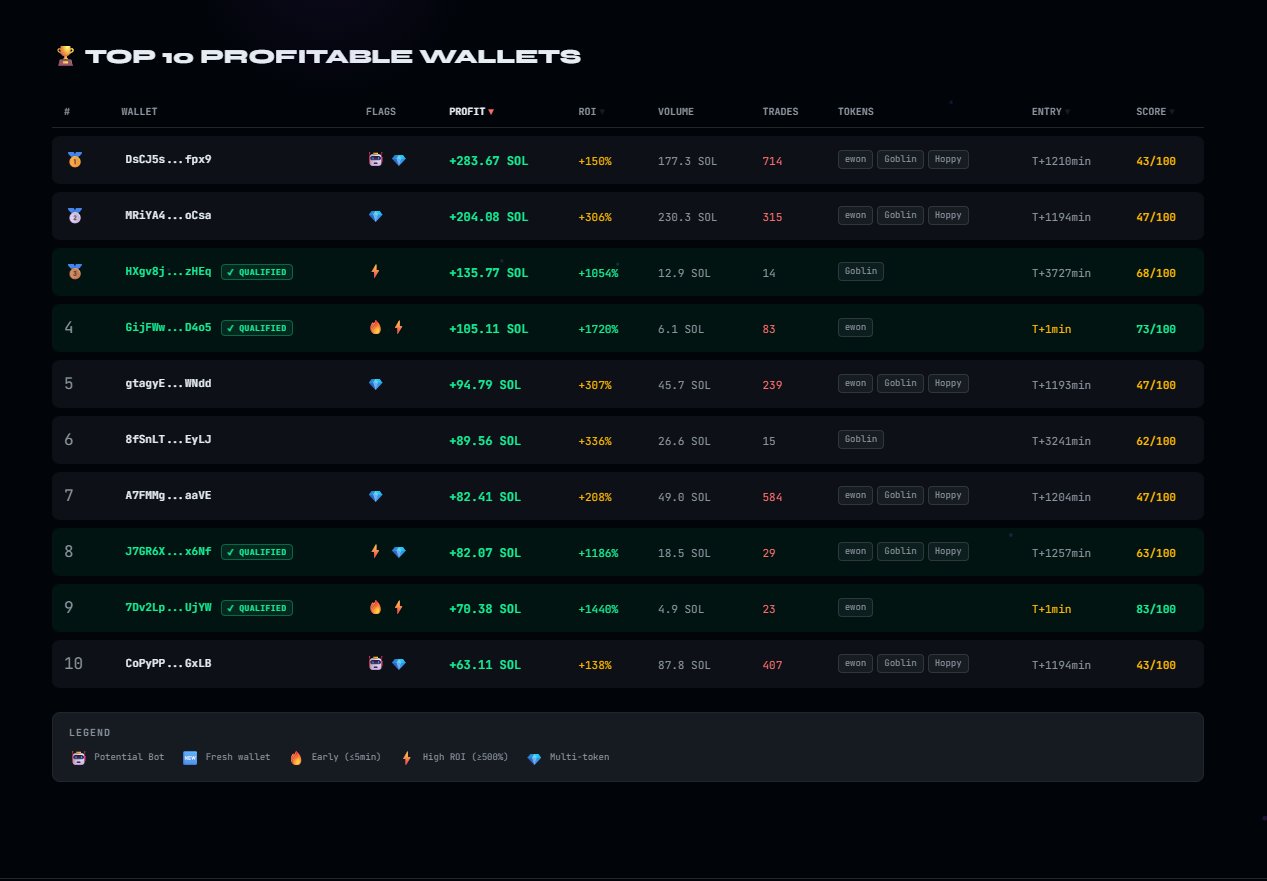
The 10 most profitable wallets across scanned tokens, ranked by net profit.
Wallets matching your custom criteria (min ROI, min profit).
0–100% confidence score on each card — filter out or use as intel.
Wallets that bought within the first 5 minutes — strong alpha signal.
Profitable across multiple tokens — systematic pattern.
New wallets with few trades — often created for insider activity.
God Mode. Every wallet in the network, shared funder, temporal spread.
God Mode. Red badge + full funder trace in the detail modal.
God Mode. Lists every token received by direct transfer — date, sender.
Scoring — How the Score Is Calculated
| Criterion | Max | Signal |
|---|---|---|
| Entry timing | +25 pts | ≤2min = 25pts · ≤5min = 20pts · ≤10min = 10pts |
| Profitability | +25 pts | ≥50 SOL = 20pts · ≥10 SOL = 12pts · ≥1 SOL = 4pts |
| Average ROI | +10 pts | ≥1000% = 10pts · ≥500% = 7pts · ≥200% = 4pts |
| Consistency | +15 pts | +5pts per qualified token (max 15) — consistency |
| Dev Funded God | +15 pts | +15pts if funded by the creator — highly suspect |
| Cluster God | +10 pts | +10pts if 3+ wallets share the same funder |
| Bot penalty | penalty | ≥50 trades = −20pts · ≥20 trades = −10pts |
Standard vs God Mode
| Feature | Standard | God Mode |
|---|---|---|
| Scans / Day | 3 | 5 |
| Transactions / Token | 25 000 | 25 000 |
| TOP 10 wallets | ✓ | ✓ |
| Qualified Wallets (1-click) | ✓ | ✓ |
| Sort: Profit / ROI / Entry / Score | ✓ | ✓ |
| Flags: Bot / Fresh / Early / High / Multi | ✓ | ✓ |
| Full Detail Modal | — | ✓ |
| PnL 1d / 3d / 7d | — | ✓ |
| Recent Tokens with CA | — | ✓ |
| Funder Wallet + Amount | — | ✓ |
| DEV FUNDED Detection | — | ✓ |
| CLUSTER Detection | — | ✓ |
| AIRDROPPED TOKENS | — | ✓ |
| Watchlists (3 groups) | — | ✓ |
| Visual Score Breakdown | — | ✓ |
The Scanner — Interface
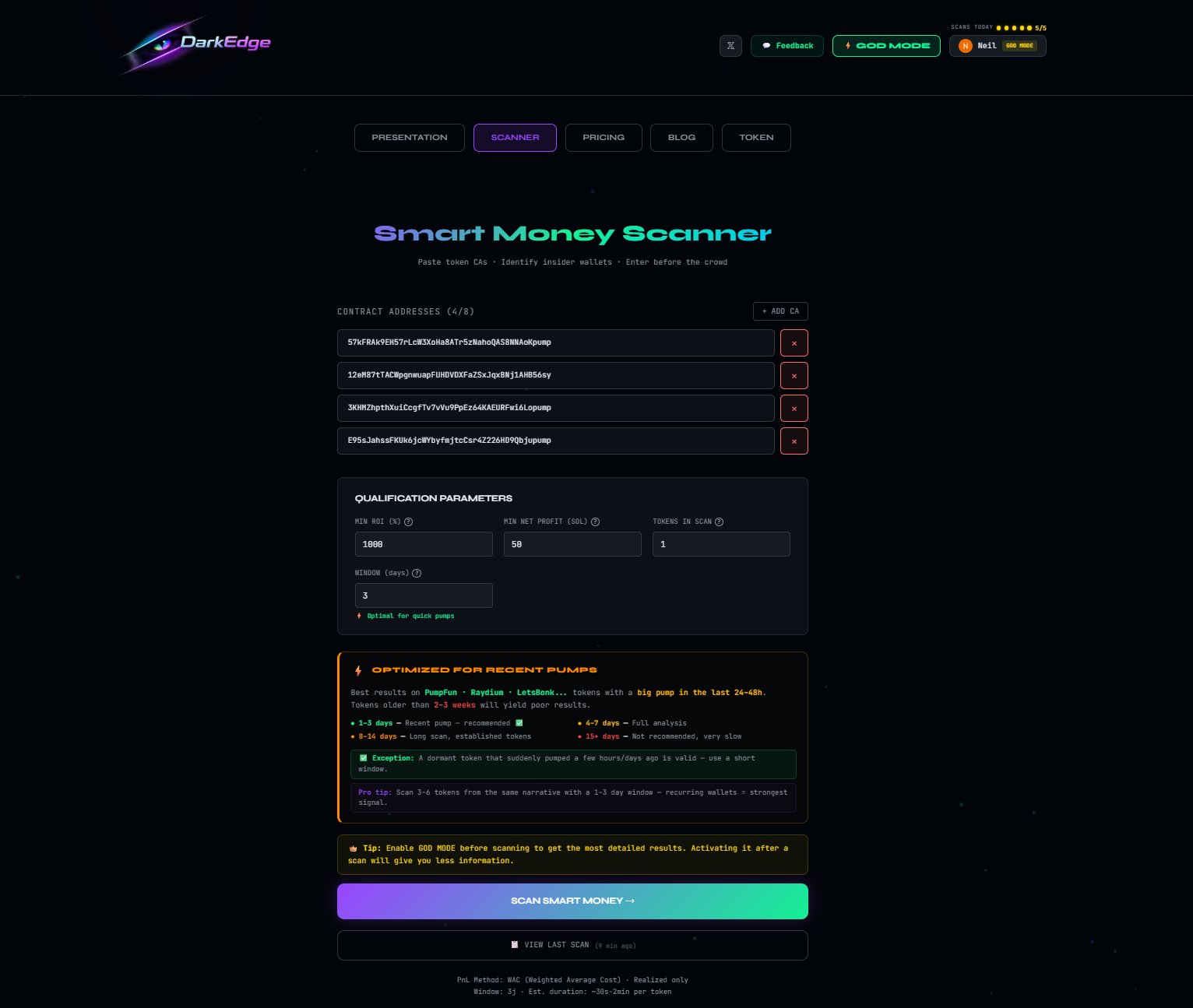
The Scanner is the starting point of every session. The UI is intentionally minimal: paste contract addresses, set your filters, launch the SCAN.
⚡ Standard Scanner
Paste 1 to 6 contract addresses. Set your min ROI, min profit SOL, min tokens, and time window in days. A recommendation panel (OPTIMIZED FOR RECENT PUMPS) helps you calibrate. Click SCAN SMART MONEY.
👑 God Mode Scanner
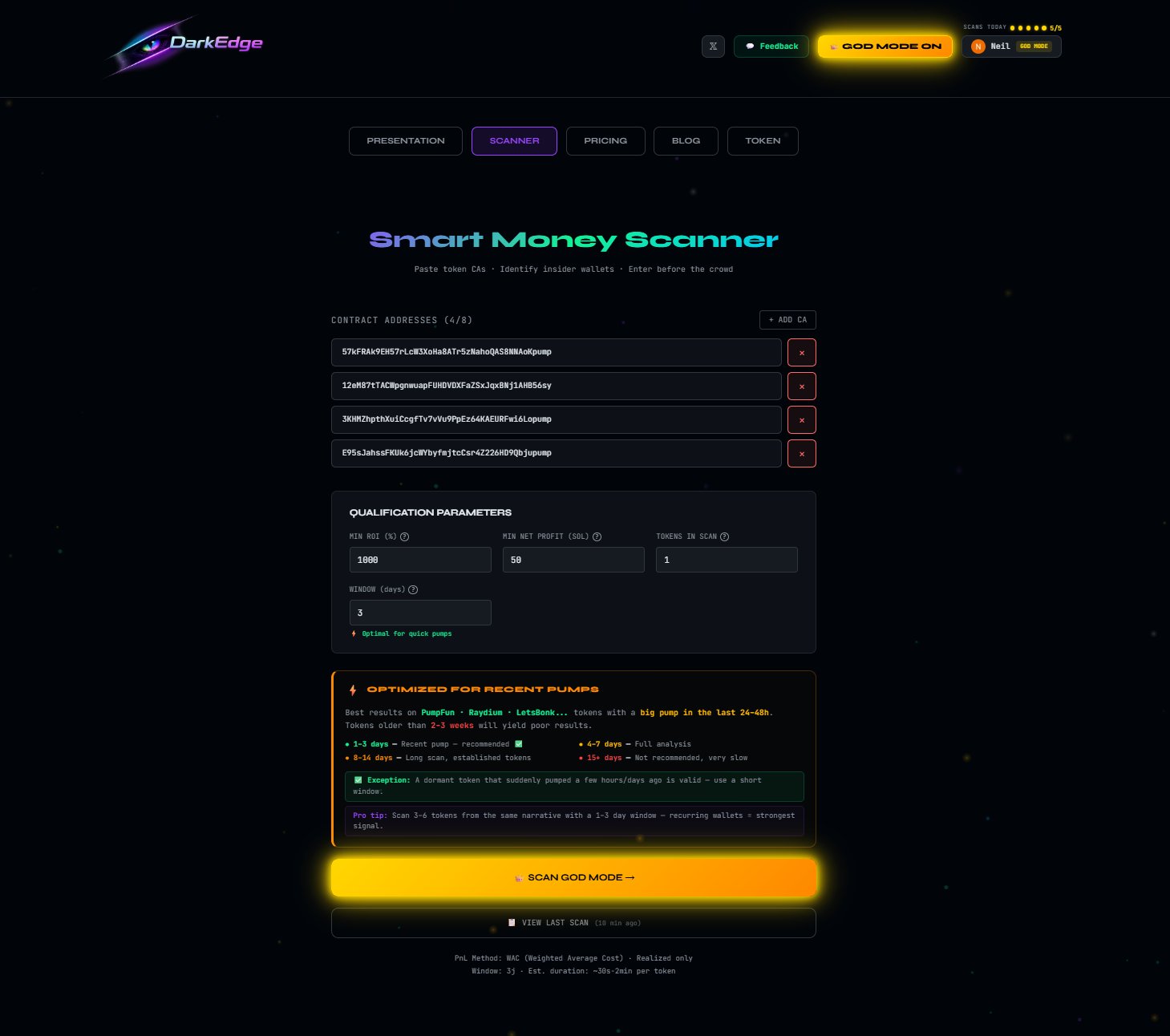
Activate God Mode from the header. A gold border and gold scan button appear. Everything from Standard applies — plus the additional intelligence layer (funder, cluster, dev-funded, airdrops) inside the results modal.
Step-by-Step Guide
Find Recent Tokens
DexScreener (6h / 24h Solana filter) or KOL / Telegram groups. Identify a wallet that consistently enters before the calls.
Activate God Mode (Recommended)
👑 God Mode in the top right before any scan. Funder/cluster/dev-funding data is only collected if active at scan time.
Paste CAs into the Scanner
SCANNER → paste 1 to 8 CAs. DarkEdge cross-references across all tokens. Don't pollute the scan with random tokens.
Set Your Criteria
Min ROI 500–1,000% · Min profit 10–50 SOL · Min tokens 2+ · Window 1–3 days. Adjust to market conditions.
Launch the Scan
SCAN SMART MONEY. Real-time progress bar. 1–6 min depending on token count. Don't close the page.
Analyze the Results
Top: QUALIFIED by your criteria. Bottom: TOP 10 all profiles. Click a card to copy the address.
God Mode — View Details
View Details: PnL 1d/3d/7d, tokens with CA, funder, cluster, and full score breakdown.
Prioritize Red Flags
🚨 DEV FUNDED = funded by the creator · 🕸 CLUSTER = coordinated network · Score ≥ 80 = confirmed smart money.
Copy trading
Copy the address (1 click). Paste into Photon, Bullx, GMGN, or your tracker. Set up alerts.
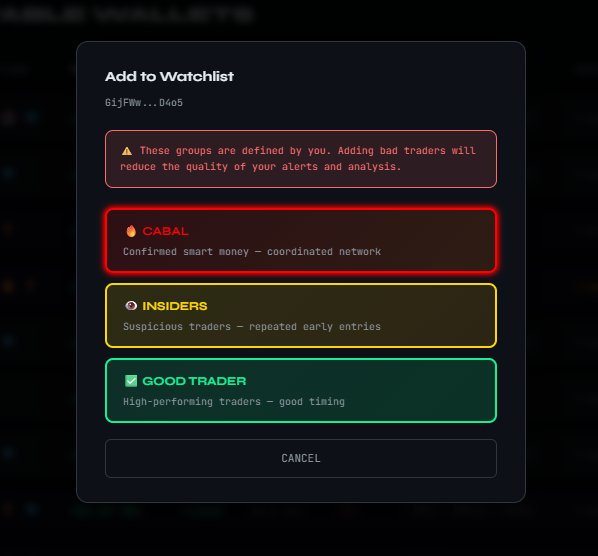
Watchlists (God Mode)
+ WATCHLIST on any wallet → CABAL, INSIDERS, or GOOD TRADER. Persists between sessions.
Complete Flag Legend
Behavioral detection: abnormal execution speed, repetitive patterns, extreme temporal concentration. Confidence 0–100%. A filter, not an absolute disqualifier.
≤ 5 total trades, 1 single token. Often created for an insider operation. Correlated with DEV FUNDED or CLUSTER → strong signal of coordinated setup.
Entry within the first 5 minutes of the first swap. Combined with high ROI across multiple tokens: the most reliable alpha signal.
Average ROI ≥ 500% on scanned tokens. Exceptional performance. Cross-reference with trade count.
Profitable on ≥ 2 tokens in the same scan. Repeated pattern — the most important consistency criterion for copy trading.
God Mode. Wallet that received its initial SOL from the token creator's address or a coordinated funder. Critical signal.
God Mode. Shares the same funder as one or more other wallets. The larger the cluster, the stronger the signal.
God Mode. Received tokens via direct transfer — not through a DEX purchase. Often an insider pre-distribution.
Results
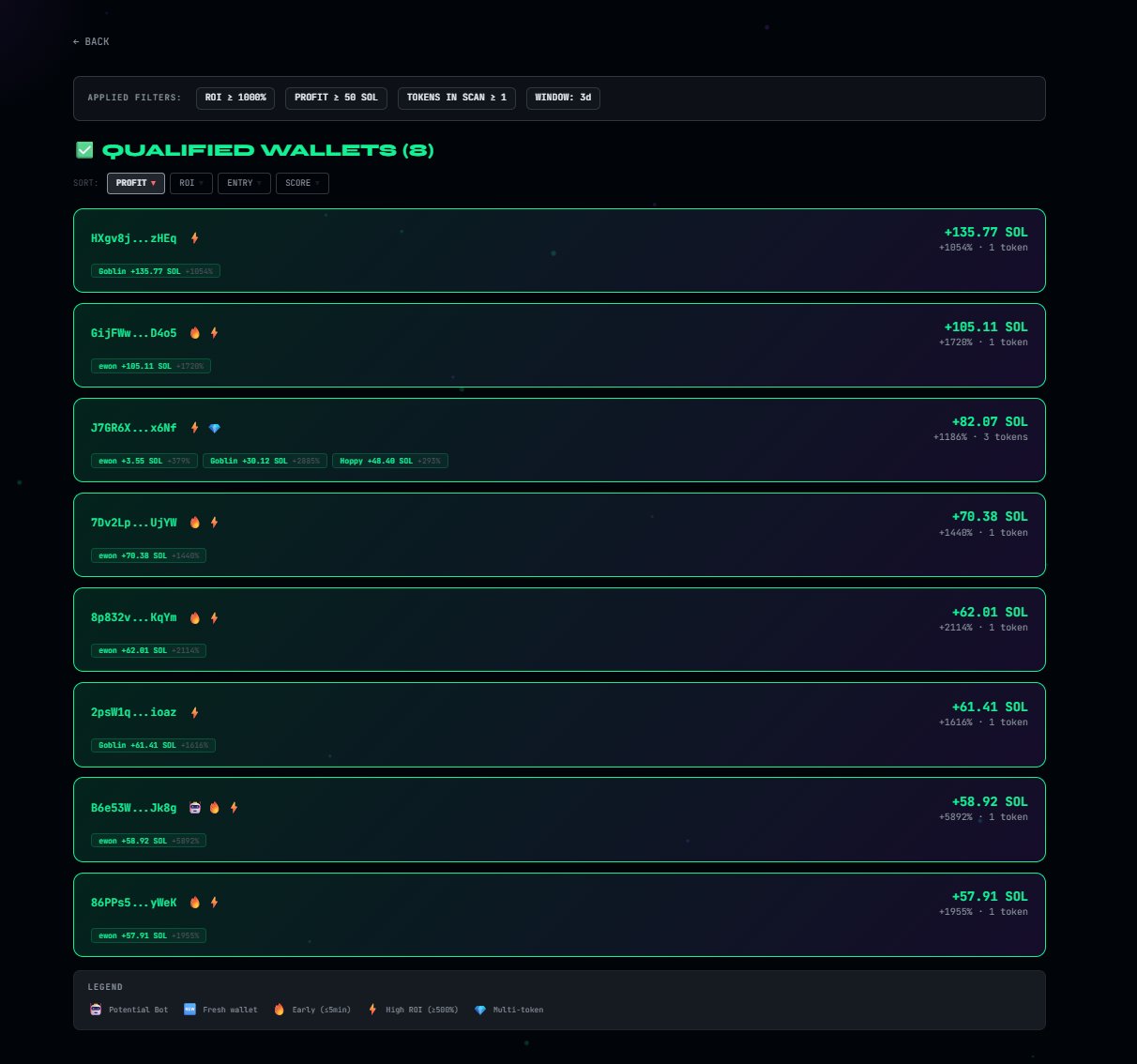
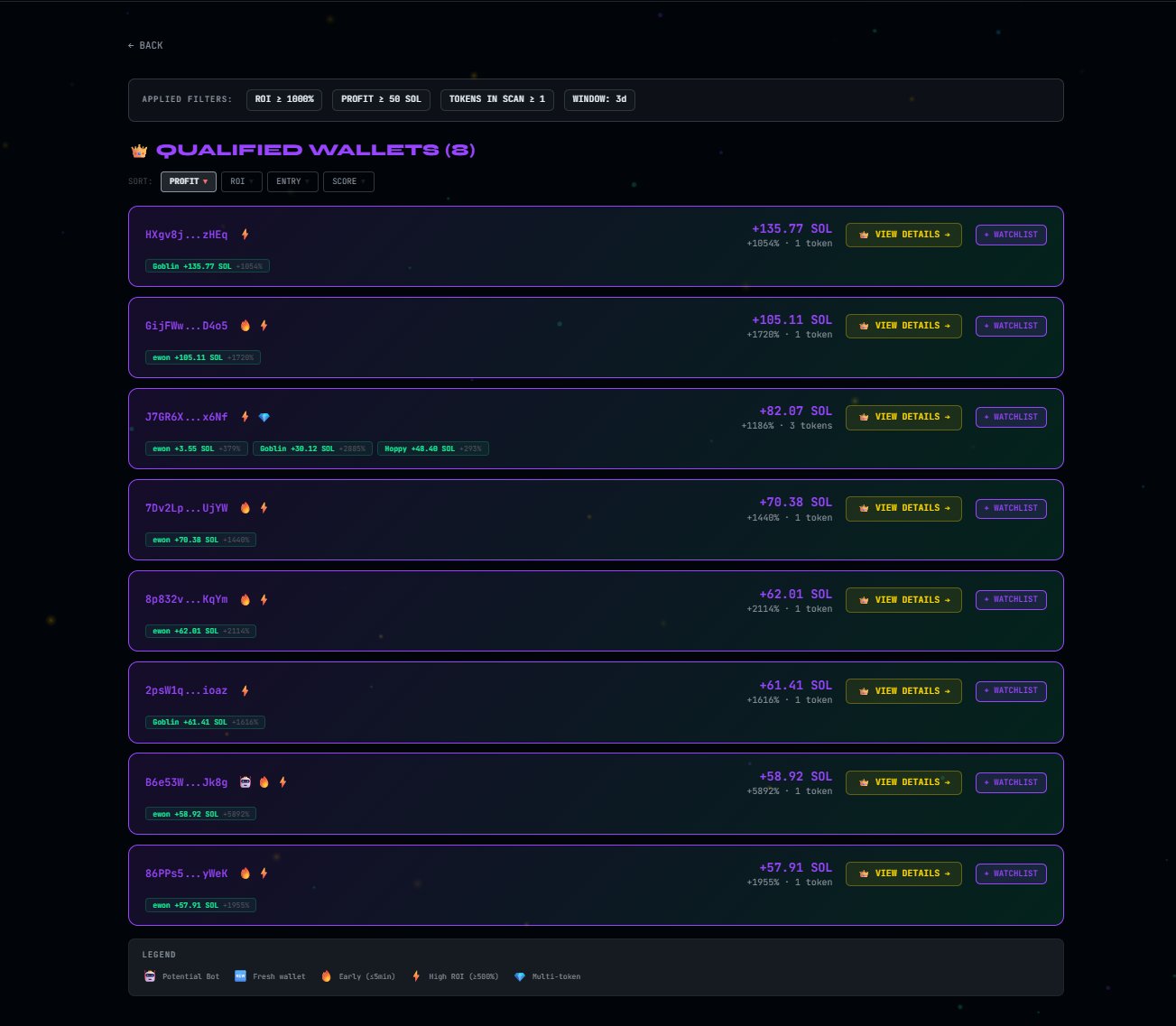
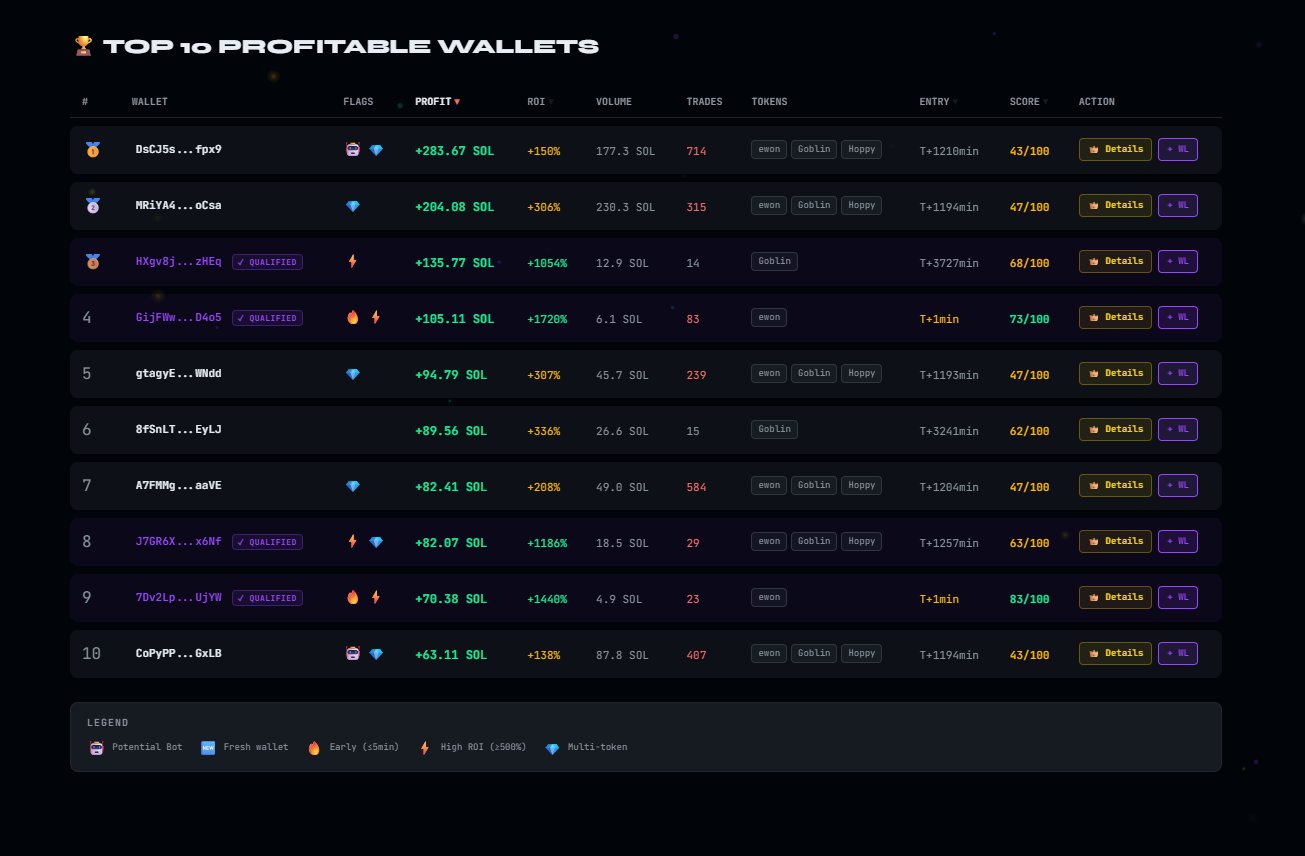
Results are organized into two sections: QUALIFIED WALLETS and TOP 10 PROFITABLE WALLETS. The goal isn't just to show profit — it's to surface recurring behaviors that betray an informational edge.
How to Read the Results
Each card shows the wallet, its active flags, net profit in SOL, ROI, token count, and Insider Score. Sorting by profit is the most intuitive starting point, but sorting by ROI, ENTRY, or SCORE is often more powerful for isolating true insider profiles.
TOP 10 Table Columns
| # | Absolute rank by profit on the scan |
| WALLET | Truncated address + qualification status |
| FLAGS | Bot, Fresh, Early, High ROI, Multi-Token, Dev Funded, Cluster |
| PROFIT ↑ | Net realized profit in SOL |
| ROI | Average return on scanned tokens |
| VOLUME | Total SOL volume traded |
| TRADES | Number of detected transactions |
| TOKENS | Number of tokens the wallet traded |
| ENTRY | Average entry time relative to the token's first swap |
| SCORE | Insider Score / 100 |
God Mode — Actions per Wallet
The God Mode Modal
The God Mode modal is the heart of the product's depth. This is where the scan shifts from a simple wallet ranking to a structured understanding of each wallet's behavior, funding, and network.
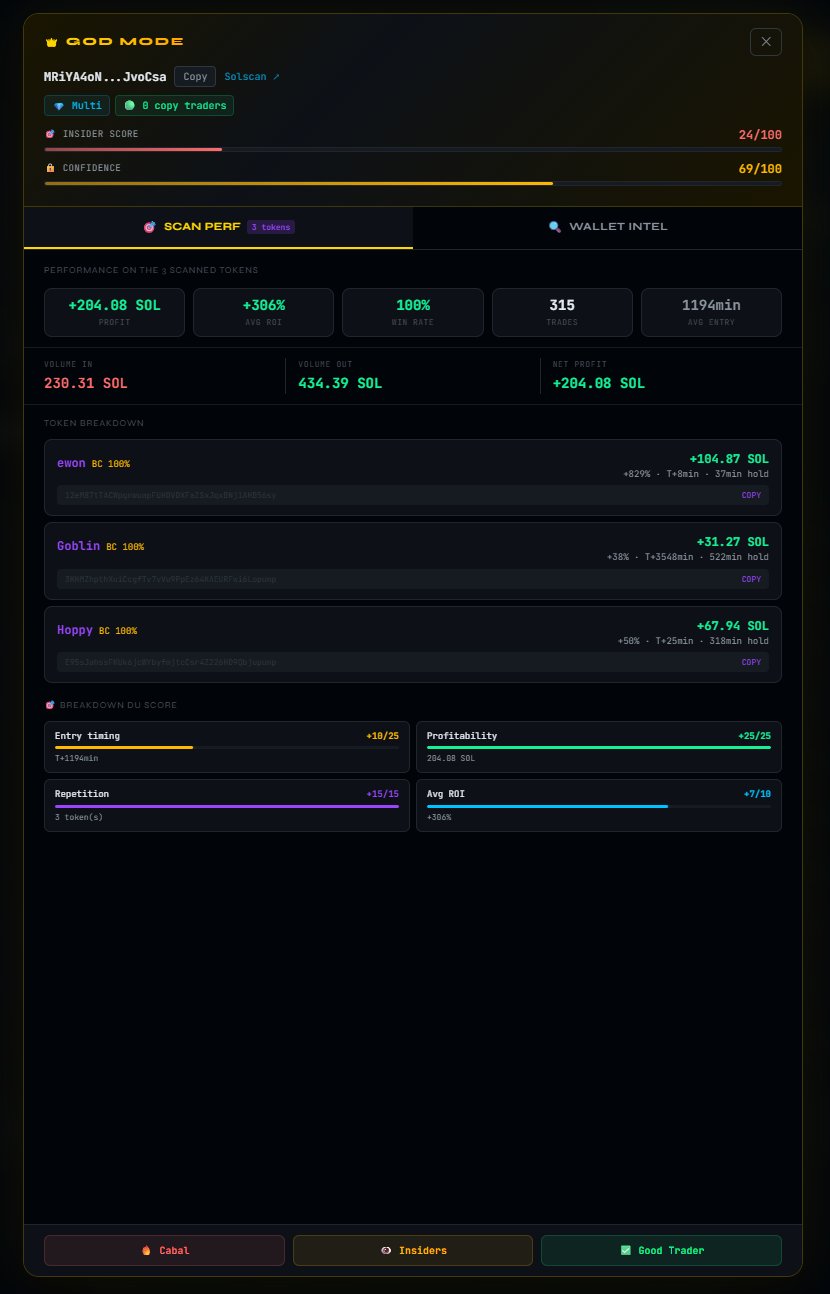

SCAN PERF Tab
This tab explains why the wallet surfaced in the current scan. It shows the score breakdown, per-token statistics, early entries, and the visual distribution of signals that make up the Insider Score.
WALLET INTEL Tab
This tab broadens the picture beyond the current scan. It provides a full snapshot of the wallet over time: where the money came from, who else is connected, how the wallet trades outside of this token, and whether it shows automated behavior.
The wallet's net profit/loss is broken down across three time windows: 1 day, 3 days, and 7 days. Each block shows the USD amount and Win/Loss ratio for the period, along with the win rate percentage. This view distinguishes one-off spikes (a single lucky trade) from consistently performing wallets. When all three windows show coherent numbers, that's a strong signal of regularity.
+$31.6K · 1W / 3L · 25% → $31,600 profit over the period, 1 winning trade, 3 losing trades, 25% win rate. Profit can be massive even with few winning trades — concentration is what matters.Every Solana wallet was funded for the first time at some point. DarkEdge traces back to that originating wallet and exposes its characteristics: the truncated funder address, the initial SOL amount sent, the exact date of first funding, how many wallets that same funder has funded, the total SOL volume distributed, and its Pattern — either SINGLE (isolated funder, no network detected) or MULTI (funder supplying multiple wallets in parallel — a coordination signal).
This section detects whether tokens were received via direct transfer — without a DEX purchase. An incoming airdrop may indicate collusion with the token's team: the wallet didn't buy in, it was given tokens. This is a form of informational advantage invisible in standard charts. When no signal is detected, the section displays "No incoming transfer signal found".
If the wallet belongs to a coordinated network, this section exposes it in full. It shows: the number of wallets in the cluster, their combined profit in SOL, the shared funder and the volume it distributed, the common tokens traded by the entire cluster (with a presence ratio, e.g. 2/2 = all members traded this token), and for each network member: their address, individual profit, ROI, token count, and Insider Score.
A key indicator is the Funding spread — the time delta between each wallet's funding within the cluster. A 9-minute spread between two wallets funded by the same source is an extremely strong coordination signal. The shorter the spread, the more obvious the coordination.
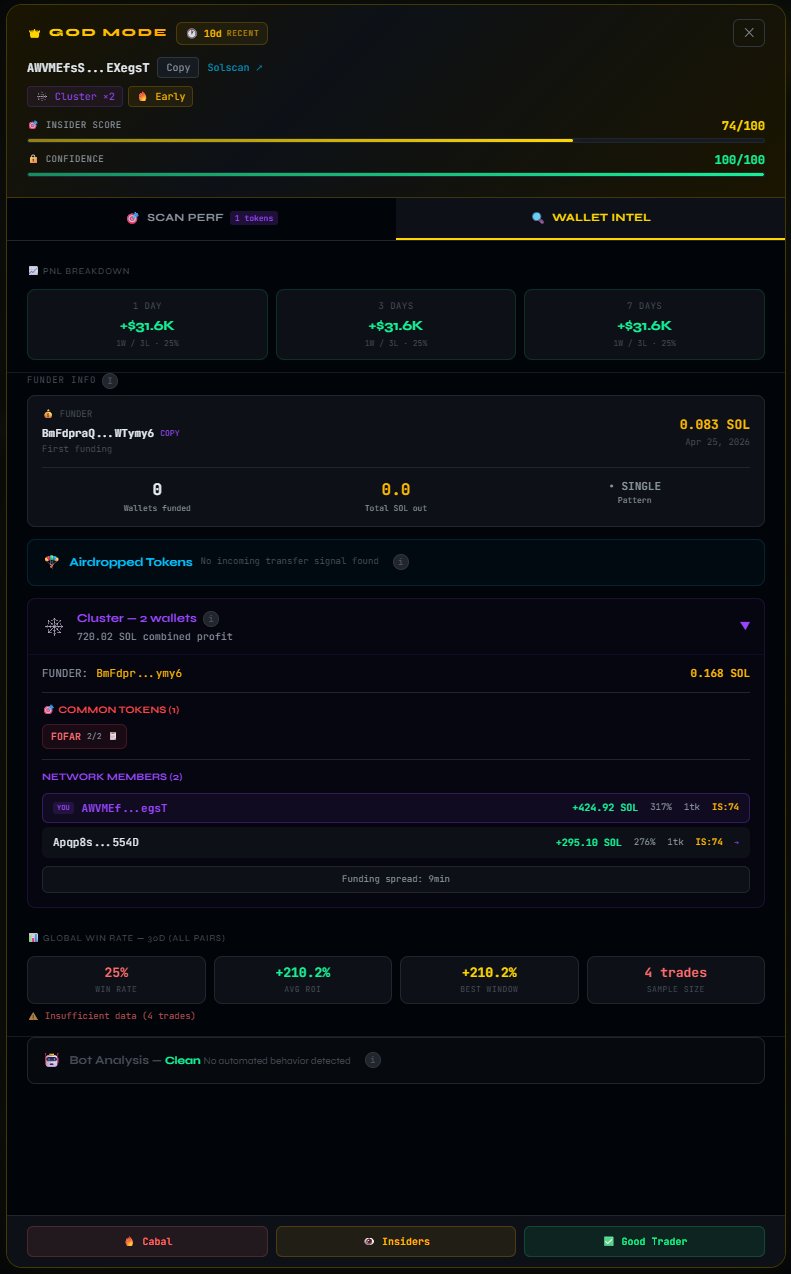
This section evaluates the wallet's overall performance over 30 days, across all tokens. It displays four metrics: Win Rate (% of profitable trades), average ROI across all trades, the best performance window, and the sample size (number of trades analyzed). Sample size is critical: a +210% ROI over 4 trades means far less than a +66% ROI over 732 trades.
DarkEdge analyzes each wallet to detect automated behavior. The analysis exposes: maximum trading speed (Max/sec), average time between trades (Avg time), pattern repetition rate (Repetition), and concentration on a single action type (Concentration). These metrics distinguish an active human trader from an automated script.
Two states are possible: Clean — no automated behavior detected — or Bot Detected with a confidence score. A wallet classified as "Potential Bot (80%)" executing 10 trades/second with 46 trades in 2 minutes should never be part of a copy trading strategy.
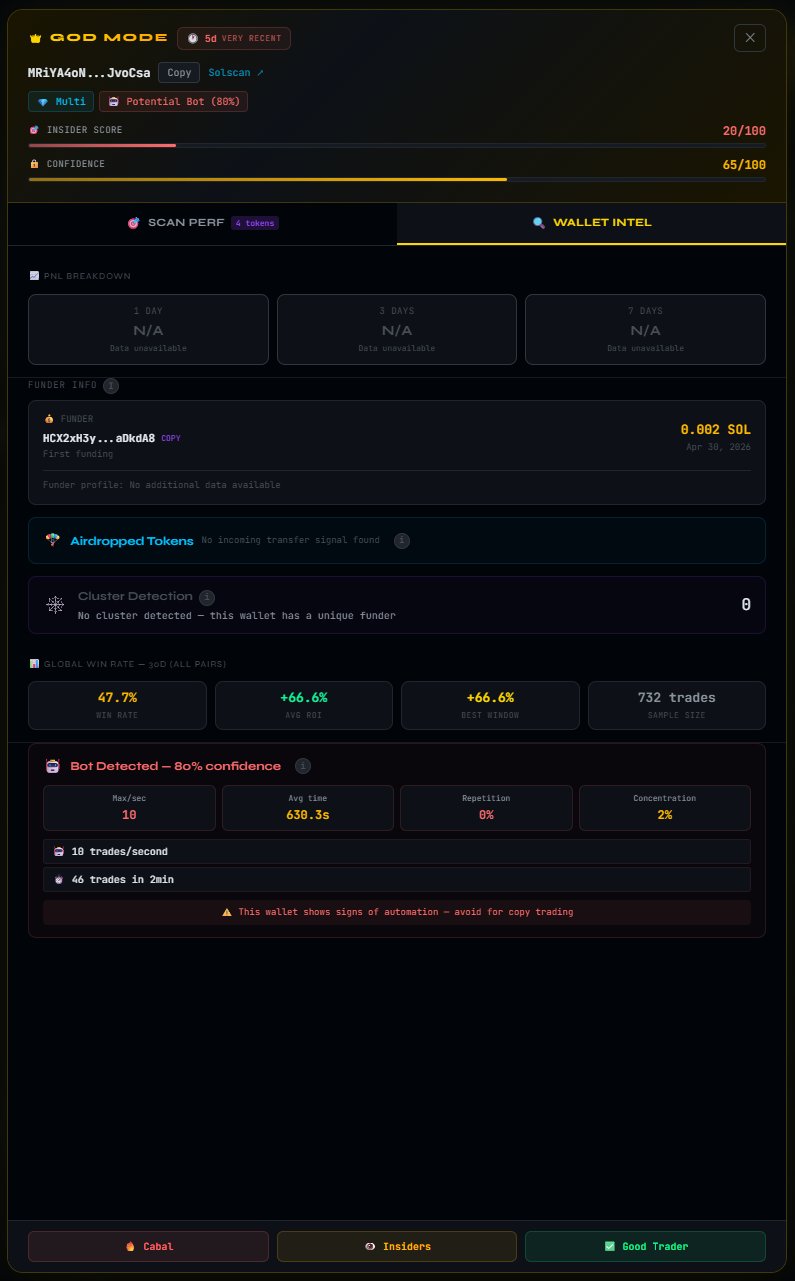
The WALLET INTEL tab is exclusively available in GOD MODE. It turns a score into understanding — providing full context behind every number.
Alert 4 God Mode
An automated system that pushes alerts on the best opportunities, fed directly by the DarkEdge database. Each signal is built from patterns detected in real time — insiders, clusters, early wallets — aggregated and scored before being pushed to God Mode users.
More Information Coming Soon
The alert system is under development. It will be exclusive to God Mode users and will leverage DarkEdge's full accumulated dataset to identify opportunities before they become visible.
Pricing & Access
1 Standard scan • 6 tokens • Insider scores
3 Standard scans • 6 tokens each • Basic intel
1 GOD MODE scan • 8 tokens • Full wallet data
3 GOD MODE scans • 8 tokens each • Premium intel
- 3 scans/day
- 6 tokens per scan
- Insider scores 0-100
- Top 10 wallets
- Status flags
- Watchlists
- 5 scans/day
- 8 tokens per scan
- Everything in Standard +
- Full wallet modals
- Realized PnL
- Win rate stats
- DEV FUNDED detection
- CLUSTER detection
- Airdrop tracking
- RugCheck scores
- AI behavior summary
Why It Matters
This isn't another dashboard.
DarkEdge answers a different question:
who knows what you don't know yet?
Roadmap
DarkEdge builds in layers: first the signal, then the depth, then the ecosystem around the product.
Resources
| Website | darkedge.xyz ↗ |
| X / Twitter | @DarkEdge_sol ↗ |
| Feedback | darkedge.xyz/feedback ↗ |